
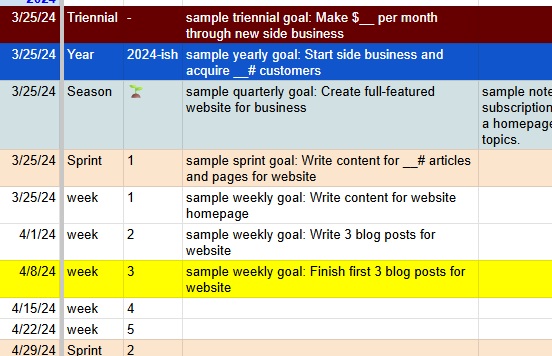
I want to share with you my favorite digital tool for tracking my goals. It’s a spreadsheet that I designed myself and honed over years of regular use.
It’s as simple as possible for its intended purpose, but no simpler. I’m pretty wary of full-fledged productivity apps; in most cases the best productivity tools I find are the basics: lists and spreadsheets. They can be customized, they don’t bother you with notifications and upsells, and they aren’t at risk of changing or going obsolete years down the line.
Now, this is a tool for tracking goals, not deciding what your goals should be. The latter can be hard, but it gets easier with experience. I’ve written about that on my personal blog here.
And a disclaimer: Goals are only half the picture. Setting concrete time-bound goals and then evaluating them as “succeeded/failed” is one way to structure your actions to get what you want in life. Another way is through systems, which are activity-based objectives that are recurring or continuous. I wrote about the differences and advantages of goals and systems in This blog post. The gist, though, is that I believe some degree of goal-setting is advantageous for most people.
Try it out
To try out the goal-tracking sheet, first open the spreadsheet template. Then make a copy of it for yourself.
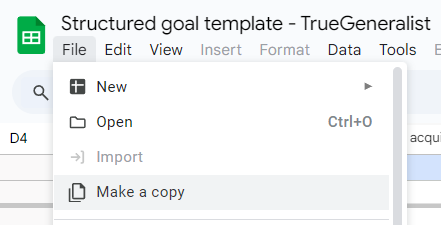
Then open the copy, so you can edit it. The basics are:
- Goals are arranged in a hierarchy of triennial(3-year period)->year->season->sprint->week.
- You write a goal for each period. Shorter-period goals should ladder up to the longer-period goals that they fall under.
- The “years” start in Spring, so they are not strictly calendar years. This way the course of the year follows the rhythm of nature, and it lets us make the Mon-Sun week a fundamental unit that fits evenly into all the larger time periods.
I’ve prepared a little video to walk you through it:
And that’s all! To use it beyond three years, you simply expand all the rows, copy everything (the whole triennial), paste it into the next rows below, and clear out the values so it’s blank.